ADHYORA

Academic Management System

The entire college.
One calm, powerful system.

0
Active Users Nationwide

The Essence

"Adhyora is a modern name derived from the Sanskrit root Adhyayan, which means learning. Adhyora represents a platform that supports and manages the entire academic journey."

Adhyora is an integrated college management platform designed to simplify and centralize academic administration. Principals and administrators can manage student and teacher records, academic calendars, attendance, marks, and institutional activities with complete control and visibility. Teachers can efficiently manage department-wise student data, attendance, marks, timetables, and academic progress, while students access all their academic information, schedules, attendance, marks, and important college updates in one unified app.

Our Vision

We are driven by the dream to eliminate the old paper-based methods and fully digitalise all colleges in India. Adhyora is our commitment to building a faster, smarter, and more transparent future for educational institutions nationwide.

Centralized Admin

Command center for Principals to oversee every department and institutional record with total authority.

Faculty Efficiency

Empowering teachers with digital tools for attendance, department workflows, and academic tracking.

Unified Hub

A single portal for students to monitor their progress, schedules, and stay connected with college updates.

Deployment Protocol
01

Data Import

We migrate your existing student and faculty records securely into the Adhyora cloud architecture.

02

Structure Config

Configure your academic year, NEP/Traditional syllabus mode, and attendance calculation logic.

03

Live Deployment

Issue credentials to staff and students. Your institution is now fully digital and operational.

NEP & Traditional Support

Future-proof your institution. Adhyora supports both the New Education Policy (NEP) and Traditional Syllabus structures. Simply select the syllabus method your college follows, and the platform will exclusively configure itself to run on that specific academic standard.

Adaptive Attendance Logic

Every university calculates differently. Adhyora supports Multiple Calculation Modes—whether it's session-based, hour-based, or subject-specific percentage thresholds. We adapt to your rules, not the other way around.

One Platform

Three Portals. Principal, Teacher & Student.

Every role gets a workspace built for what they actually do. Hover or tap a portal to explore it.
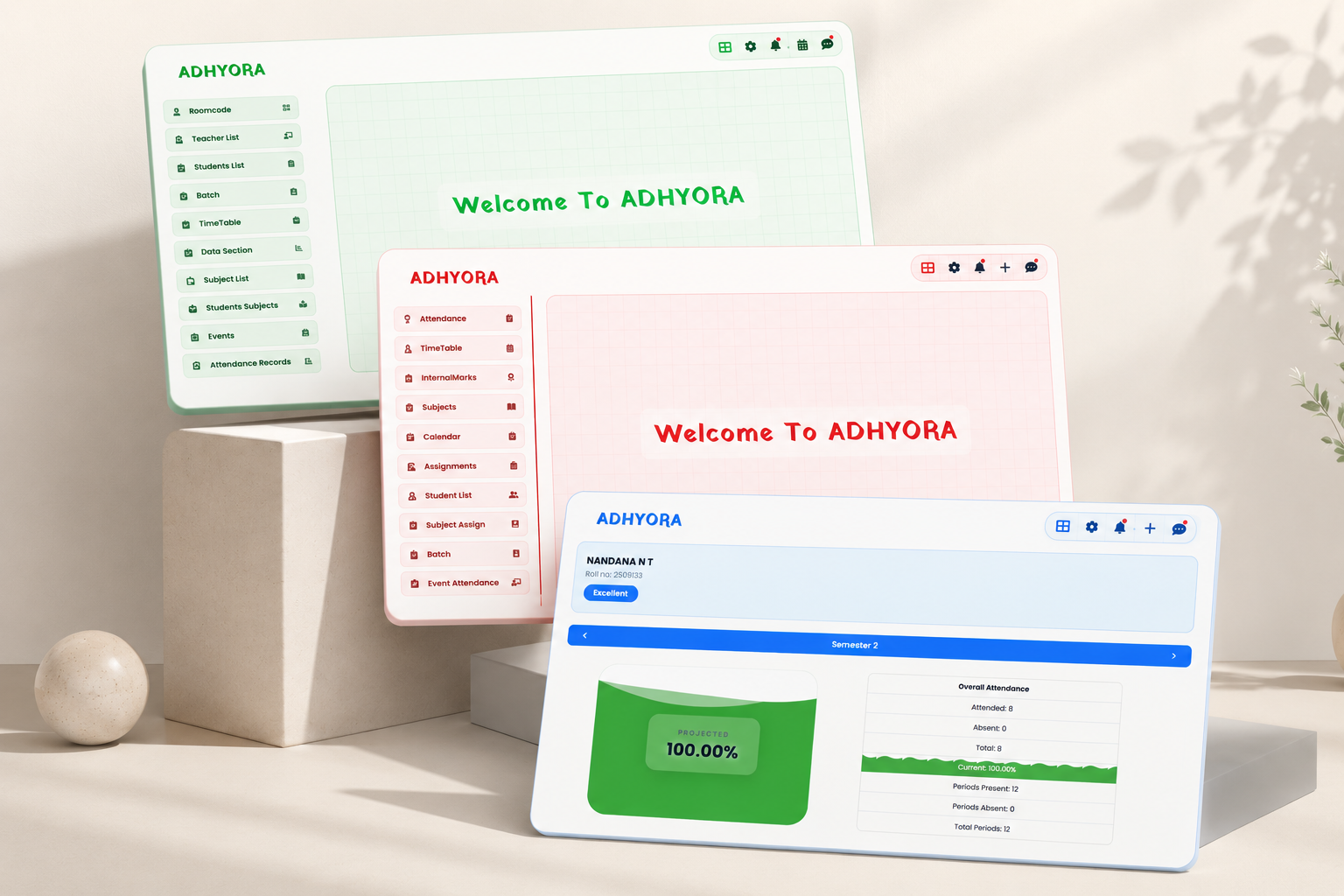
Adhyora Principal, Teacher and Student portals shown on three devices

See It In Action
9:41
Welcome, Teacher
Attendance
TimeTable
InternalMarks
Subjects
Calendar
Assignments
Student List
Subject Assign
Sections
Batch
Event Attendance
Promotion Holds

Attendance

Records
Friday
20/11/2026
Sem 5
Period 1
Data Structures
Save Attendance
Saving Attendance...
Teacher
9:41
9:41
Roomcode
Teacher List
Students List
Removed Students
Batch
TimeTable
Data Section
Subject List
Students Subjects
Events
Attendance Records
Admin Requests

Data Management

Principal
9:41
9:41
Aarav Nair
Roll No: CS101
Excellent
<Semester 5>
Promotion Status: Clear
No active hold on your promotion.
Tap to view details & history ›
Projected
--%
Overall Attendance
Attended: 41
Absent: 8
Total: 49
Current: 84.25%
Periods Present: 246
Periods Absent: 46
Total Periods: 292
SUBJECT ATTENDANCEAll Time
Internal Exam 1▾
MY CURRICULUM
Mon
Tue
Wed
Thu
Fri
⚙️
📊
📋
🔔
💬
📚
📝
Student
Principal Control Panel

The Principal's Command Deck

One login. The entire institution, in your pocket.

12 MODULES
Room Codes & DepartmentsJoin codes per department. Add departments with a course duration, regenerate or combine.
Teacher HubHours taught, subjects, timetable and a dated attendance timeline per teacher.
Student 360°Attendance, internal marks, subjects and the full fee ledger for any student.
Student AdminEdit details and account status. Remove a student with a recorded reason (TC issued or other).
BatchesMove students between batches, or split a batch by department.
Timetable BuilderSet period count, start time and lunch break, then assign classes day by day.
Subjects & EnrollmentEdit the subject master, and assign or reassign subjects for selected students.
Academic CalendarPublish the calendar and override any day as a working or non-working day.
Rules & PromotionAttendance-mark tiers, odd/even semester control and one-click promotion with graduation.
Bulk Data & ExportUpload rosters, subjects and calendars by CSV. Export NEP marks, attendance stats and daily logs.
Fees & RazorpayFee rules, encrypted Razorpay keys and a payment ledger for every student.
Live Attendance TrackerA teacher-by-day grid of who marked what, as it happens.
Announcements & EventsMessage teachers or students by department, and approve event requests (auto or strict).
Admin ApprovalsApprove staff and accountant accounts before they get access.
Subscription & BillingPick or renew a plan and track licence validity, with secure online payment.
Security & ControlAdmin PIN on critical actions, biometric lock, device sessions and themes.
Staff Portal Staff can do nearly everything a principal can, with a few limits. Admin-level actions, like approving teachers, stay with the Principal only.
Accountant Portal A dedicated login to collect fees, view student fee ledgers, track college expenses and manage every finance-related function.
Educator Portal

The Educator's Toolkit

Everything a teacher touches in a day. One app, zero paperwork.

12 MODULES
Smart AttendanceToggle present or absent, save, review history and jump to any past date. Medical-leave students are locked.
Substitute & Batch ClassesCover a colleague's period or open a batch class and mark it from your own app.
My DashboardHours taught, subjects handled and a dated attendance timeline you can filter.
TimetableYour weekly schedule. Department heads assign classes day by day.
Internal MarksAdd exams and enter test and assignment marks. Attendance marks are added from your college's rules.
My SubjectsChoose or remove the subjects you teach each semester.
AssignmentsPublish by year, semester and subject with due dates. Students are alerted instantly.
Student RecordsSearch students, open their dashboard and see subject-wise attendance ledgers.
Event AttendancePT, library or multi-day camps: add students, set times, review history, send to the principal.
Promotion Holds HODBlock promotion for shortage, arrears (pick the failed subjects), fees or discipline, with history.
Subject & Section Assign HODAssign subjects and sections to unassigned students in bulk.
Batch Viewer HODView batches by subject and split them by department.
Data Export HODDownload NEP internal marks, attendance percentages or daily logs by semester and section.
Academic CalendarWorking days, holidays and upcoming events at a glance.
Messages & AlertsMessage the principal or other teachers, chat privately and get push notifications.
Security & DevicesSecurity PIN with password re-verification, active sessions, biometric lock and themes.
Student Dashboard

The Student's Pocket Campus

Attendance, marks, fees and classes. Always one tap away.

12 MODULES
Attendance MeterA live water-fill gauge with attended, absent and total counts and a projected percentage.
Leave PredictorTap the gauge, enter the days you plan to take off and see how far your percentage will drop.
Subject-wise AttendancePresent and total per subject, for all time or one date. Tap a subject for every record.
Daily AttendancePick any day, tap a period to see subject, teacher, time and status. Medical leave is flagged.
Promotion StatusSee if your promotion is clear or on hold, with the full hold history.
Internal MarksExam-wise test, assignment and attendance marks added up out of the maximum.
Curriculum & CatalogYour enrolled subjects and the full subject catalog for your semester and department.
TimetableMonday to Friday timeline with subject, teacher and room for every period.
AssignmentsTopics, descriptions and due dates the moment a teacher publishes them.
Academic CalendarWorking days, holidays, events and semester dates on one calendar.
Teachers & MessagesBrowse your teachers, message them or the principal, and read college broadcasts.
NotificationsPush alerts plus an in-app list, so nothing slips past you.
Fees PortalPay online with Razorpay and keep your digital receipts.
My ProfileYour profile details, one tap from the dashboard.
Make It YoursFive accent colours, light and dark mode, and UI sounds.
DevicesSee every device currently logged in to your account.

Ironclad data security.

Student data is sensitive. Adhyora employs bank-grade encryption standards to ensure that your institutional data remains private, secure, and accessible only to authorized personnel.

  • Bank-Grade Data Encryption (AES-256)
  • 99.9% Uptime Google Cloud Infrastructure
  • Granular Role-Based Access Control (RBAC)
  • Verified Institutional Access Only
Investment Plans

Adhyora Base

₹59/student

Essential Features

  • Full Administrative Control
  • Faculty & Student Portals
  • Attendance & Marks Tracking
  • Real-time Campus Alerts
  • And more
  • Cancel Anytime
Get Started
MOST POPULAR

Adhyora Pro

₹79/student

Advanced Management

  • Everything in Base
  • Fee Payment System
  • Fee Management Tools
  • Priority Technical Support
Get Started Now

Adhyora Ultimate

₹99/student

Maximum Automation

  • Everything in Base & Pro
  • Automated Parental Alert Networks
Get Started
System Inquiries

Is Adhyora compatible with the new NEP structure?

Yes. We have built a dedicated NEP Logic that handles multi-disciplinary courses, flexible subject choices, so colleges can choose correct syllabus.

Can we export data for NAAC/Audit reports?

Absolutely. Principals and Admins can export comprehensive Excel reports on attendance, marks, and faculty performance with a single click.

Is the student data secure?

We use industry-standard encryption protocols. Data access is strictly role-based, meaning a student cannot access another student's data, and unauthorized access is blocked.

How long does setup take?

Setup is rapid. Once we receive your student and faculty lists, our team configures your instance within 48-72 hours.

Ready to Transform Your Campus?

Download App Now